Radar Maps, Navigation Lines and ECDIS Overlay
RadarHow radar maps, navigation lines and routes are built and checked on the radar, how an electronic chart overlay works and why a GNSS error shifts it, which display modes suit navigation, and which radar alarms the bridge team must recognise. A safe-pilotage skill and a regular Malta radar exam subject.
Last reviewed 1 Nov 2026 · From a professional captain's years of study notes · Organised with AI and checked against current regulations · How we write
On this page (9)
Radar Maps and Navigation Lines
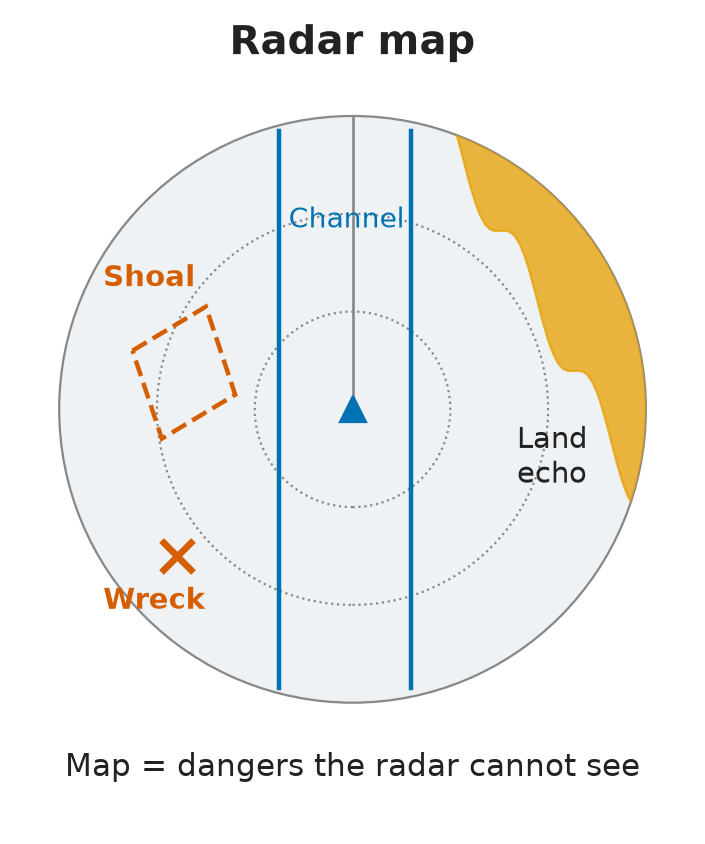
In short: a radar map is a layer of lines and symbols drawn over the radar picture, used mainly to show dangers the radar cannot see.
- What goes on it: shoals, wrecks and reefs (no echo, so radar-invisible), channel limits and traffic separation schemes (TSS).
- Build or reload: maps can be saved and reloaded per area, or built in real time on the display.
- Reference: each element is tied either to own ship or to a geographic position.
- Routes: the planned route can be imported from the GPS / navigation system, so the track appears on the radar.
- Same symbols everywhere: symbols and colours are preset by IMO — first issued as SN/Circ.243, now
IMO SN.1/Circ.243/Rev.2. Like buoyage, a wreck looks the same on a radar in Malta as in Australia. - Danger — clutter: map lines must never clutter the picture. A line can lie on a small or weak echo and hide it. If in doubt, switch “synthetics off” / “maps off” and check the raw radar.
Checking the Map: Sensors, SOG and GNSS
In short: a map is only as good as the position and speed fed into it — a sensor error moves every line and symbol, so check the map against real echoes.
- Sensor errors shift the whole map. A wrong position or a wrong speed over the ground (SOG) gives a convincing but false picture.
- Check it: anchor map elements to features the radar really shows — breakwaters, coastline, buoys — and confirm the echoes sit where the map says.
- Pick the best SOG source available.
| Quantity | Usual source |
|---|---|
| SOG — speed over the ground | GNSS (GPS) |
| STW — speed through the water | Doppler / speed log |
- GNSS can fail. Solar flares (space weather) can spoil coverage for days: north-east of Malta, GNSS was poor for several days, equipment behaved erratically and the DSC VHF lost its position.
- When GNSS is suspect, cross-check SOG and position by other means — log, radar fixes, visual bearings (
MGN 379 (M+F)4.5: never rely on one position source). - Deliberate GPS errors? You may hear that GPS errors are added on purpose “for security”. That was Selective Availability, switched off in 2000. Today’s errors come from space weather, interference, jamming and spoofing.
Electronic Chart Overlay: The Rules
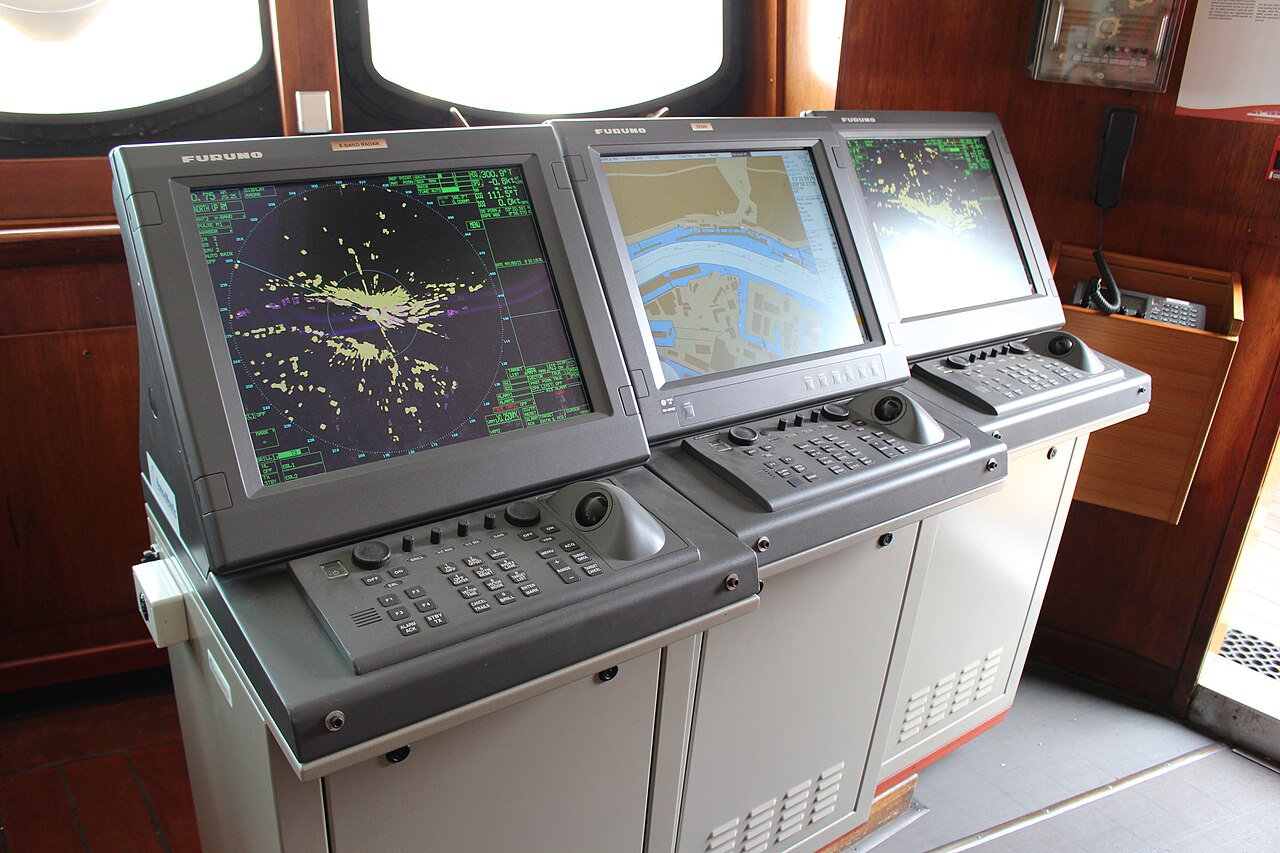
In short: many radars can show the ENC under the echoes. It is optional under IMO MSC.192(79), but where fitted it must never get in the way of the radar.
Rule (IMO MSC.192(79)) |
Why |
|---|---|
| North-up or course-up only — never unstabilised head-up | A head-up picture swings with every yaw; the chart could not stay aligned |
| Chart uses the same datum, scale, orientation, reference point and stabilisation as radar and AIS | Otherwise chart, echoes and AIS symbols would not line up |
| Radar information has display priority | The ENC must never cover, mask or weaken echoes |
| Chart removable with one operator action | Radar stays the primary anti-collision tool |
Reading the Overlay: GNSS Errors, Coastlines and Collision Avoidance
In short: the overlay is a quick position check — if the charted coast sits on the land echoes, the position is good; if not, trust the radar.
A parallel index at a glance
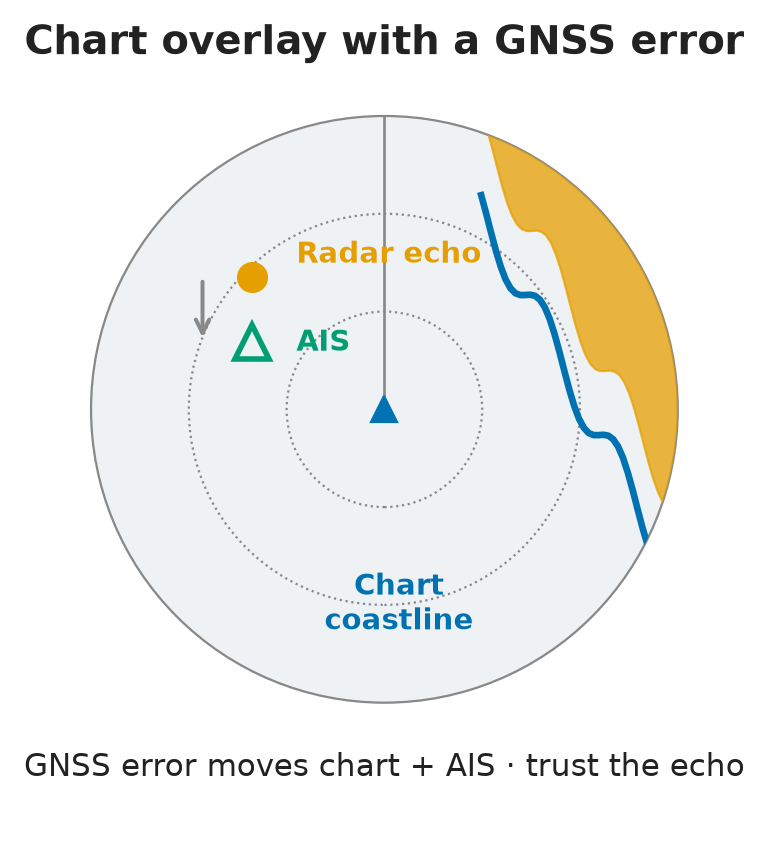
- If the charted coastline sits on the land echoes, the position input is good — like a parallel index you read at a glance.
- The overlay is the best way to cross-check GNSS integrity (
MGN 379 (M+F)5.10: radar overlays can check the ECDIS position input). - Danger: the chart is placed using the EPFS (electronic position-fixing system, usually GNSS). An EPFS error moves the whole overlay — the known weakness of the method.
- Example: a GNSS error to the south shifts the chart and AIS targets south, but the radar echoes stay put. The radar does not depend on GNSS — trust the echo.
Low coasts never match perfectly
- The radar coastline is not the charted coastline, especially on low coasts.
- What reflects is the land behind the waterline — cliffs, buildings, rising ground — so do not expect a perfect fit there.
Take the chart off for collision avoidance
- For collision avoidance, remove the ENC: it adds clutter, and if it carries a GNSS error you may take a ship’s echo for land.
- Overlaid target data does not replace radar observation — take collision decisions on the radar (
MGN 379 (M+F)5.10). - Whenever an echo looks doubtful, look at the raw radar with no chart and no synthetics.
Bridges and tides in the plan
- Bridges give strong echoes and stand out clearly on the overlay.
- Note each bridge in the passage plan with the air draught and the height of tide needed to pass under it.
- If clearance is tight, the ship may have to wait for the right tide — sometimes up to two weeks for a spring low tide.
- In ports with a large tidal range (Felixstowe about 5 m), keep adjusting the gangway and tending the mooring lines alongside.
Display Orientation and Motion
In short: for navigation near land use true motion, north-up; avoid an unstabilised head-up picture.
- Head-up (unstabilised): the heading marker is fixed at 0°, so the picture spins when the ship yaws. It also smears echoes, gives relative bearings only (conversion errors), is hard to compare with a north-up chart and makes plotting unreliable during turns.
- True motion, north-up: own ship moves across the screen, fixed echoes stay still, moving targets show their true course. Best near fixed objects.
- Relative motion: own ship stays fixed and the land moves across the screen — fine for collision avoidance, less so for coastal navigation.
- Memory aid: navigation → true motion · anti-collision → relative motion.
- Exam keywords: “fixed objects” + “north orientation” → true motion, north-up.
Radar Alarms
In short: a radar is a set of computers living with heat, dust, rolling and pitching — it can fail, and its alarms tell you when.
Alarms the radar must give
- Picture frozen — the display has stopped updating. Flashing visual alarm with ACK + audible alarm; the visual alarm stays until the cause is cleared, even after acknowledgement.
- Signal source / sensor failure — loss of the THD (transmitting heading device, the gyro), the SDME (speed and distance measuring equipment, the log) or the EPFS (position).
- Voyage-plan alarms — set these too: sounding (depth) and XTE (cross-track error, distance off the planned track).
How bridge alarms escalate
- Visual — a flashing indication.
- Audible — a sounder on the bridge.
- Escalation — as with the BNWAS: backup officer → Master → mess room → general alarm.
- On watch, keep scanning every screen for anything new and flashing. A sensor (often GPS) can drop out while nothing else seems to change.
⚡ Flashcards
Test yourself, one card at a timeQ1Why put shoals, wrecks and reefs on a radar map?
AnswerThey give no radar echo — on a bare radar screen they do not exist. The map draws them back, with channel limits and TSS.
Common trapTrap: expecting the radar to “see” a shoal.
Q2A map line sits right on a small echo. What is the risk, and what do you do?
AnswerThe line can hide a weak echo. Switch synthetics / maps off and look at the raw picture.
Common trapTrap: trusting a screen full of graphics.
Q3How do you check that a radar map or route is placed correctly?
AnswerTie it to radar-visible features (breakwaters, coastline, buoys) and feed it the most accurate SOG: SOG from GNSS, STW from the Doppler / speed log.
Common trapTrap: forgetting that a position or SOG error shifts the whole map.
Q4In which orientations may an ENC overlay be shown on radar?
AnswerNorth-up or course-up (stabilised) —
IMO MSC.192(79).Common trapNever unstabilised head-up.
Q5Radar with chart overlay: what has display priority, and how quickly must the chart come off?
AnswerRadar information has priority — the chart must not cover or weaken echoes, and must go off with one operator action.
Common trapTrap: treating the chart as the main layer. Radar stays the primary anti-collision tool.
Q6The chart coastline and the AIS symbols sit south of the radar echoes. What is wrong, and what do you trust?
AnswerA GNSS / EPFS position error — it moves chart and AIS together. Radar does not use GNSS: trust the echoes.
Common trapTrap: blaming the radar. The overlay is your best cross-check of GNSS integrity.
Q7Should the ENC overlay be on for collision avoidance?
AnswerNo — take it off. It adds clutter, and with a GNSS error a ship’s echo can look like land.
Common trapTrap: deciding collision action on overlaid chart/AIS data — use the radar (
MGN 379 (M+F)5.10).Q8Your position is good, yet the radar coastline does not match the chart. Why?
AnswerOn low coasts the echo comes from what stands behind the waterline — cliffs, buildings, rising ground.
Common trapTrap: assuming a position error every time.
Q9Main disadvantage of an unstabilised head-up display?
AnswerThe picture spins when the ship yaws, so it is hard to interpret.
Common trapSmearing, relative bearings only and a poor chart match are true too — but “spins” is the exam keyword.
Q10Best display mode for navigating near fixed objects, north at the top?
AnswerTrue motion, north-up — fixed echoes stay still on the screen. Memory aid: navigation → true motion · anti-collision → relative motion.
Q11What does the "picture frozen" alarm look like, and when does it clear?
AnswerFlashing visual alarm with ACK + audible alarm. The visual alarm stays until the cause is cleared.
Common trapTrap: thinking acknowledging it clears it.
Q12Which sensor failures must the radar alarm for, and which voyage alarms do you add?
AnswerTHD (gyro), SDME (log), EPFS (position). Add sounding and XTE alarms. Bridge alarms escalate in 3 stages: visual → audible → escalation (as BNWAS).
📚 Resources
Video
Books
- Radar and ARPA Manual: Radar, AIS and Target Tracking for Marine Radar Users, Alan Bole, Alan Wall, Andy Norris — 3rd edition (Butterworth-Heinemann, 2014)
Regulations
- IMO MSC.192(79) — Revised performance standards for radar equipment — optional chart overlay, radar display priority, radar alarms
- IMO SN.1/Circ.243/Rev.2 — Guidelines for the presentation of navigation-related symbols, terms and abbreviations — the common symbol set for radar maps and navigation lines
- MGN 379 (M+F) Amendment 1 — Use of electronic navigational aids — 5.10 on ECDIS overlays; 4.5–4.6 on GNSS reliance and errors
Official sites
- The Navigator, issue 27 (June 2021) — Navigational layers — free Nautical Institute / RIN issue on combining radar and chart layers and checking GNSS against the radar
Exam focus — Malta
Format: about 20 multiple-choice questions online (bring a laptop or tablet, not a phone). Eliminate the wrong options first, then look for the keywords. Some questions show a radar screenshot: read vectors, trails, range and settings (e.g. “identify the configuration error” — one option is a short pulse at 12 NM where a long pulse is expected; “error in the target tracking display” — one option is trails relative instead of true; answers not confirmed). In the simulator a sensor (often GPS) may be disabled, visibility changed or targets moved. Typical questions: (1) Chart overlay with a GNSS error — what moves? → chart and AIS shift, echoes stay — trust the radar. (2) Allowed orientations for an overlay? → north-up / course-up, never unstabilised head-up. (3) Disadvantage of head-up? → the picture spins when the ship yaws. (4) Best mode near fixed objects, north orientation? → true motion, north-up. (5) What is a radar map for? → radar-invisible dangers (shoals, wrecks, reefs). What examiners want: radar keeps display priority and stays the primary anti-collision tool; the chart comes off with one action and is removed for collision avoidance; maps and overlays are checked against real echoes; frozen-picture and sensor alarms (THD, SDME, EPFS) are recognised and acted on.